Investing in Equity Crowdfunding (ECF) on pitchIN not only supports local entrepreneurs but can also provide significant tax benefits. Under the Budget 2021 initiative (extended through 2026), individual investors are eligible for an income tax exemption equal to 50% of the amount invested, capped at RM50,000 per year.
Here is how you can file your ECF Tax Exemption:
1. Check the Amount Eligible for the Tax Assessment Year
To qualify for the tax exemption, you must hold the shares invested for at least two (2) years from the date the investment was completed (the closing date of the campaign). No shares from the investment may be sold during this period.
For example: Your investment was made in 2023. You can claim for tax exemption in the Year Assessment 2025 (after 2 years), which you will file in 2026.
You will be able to check the investment amount eligible for the current tax assessment year by login in to your pitchIN account by mid March every year.
2. Check Your Eligibility
Before you file your tax exemption, please make sure to check your eligibility requirements before filing.
Note: This exemption is subject to a limit of 10% of your aggregate income for the relevant Year of Assessment. If you have highly specific legal or financial questions regarding your tax position, we recommend consulting a professional tax advisor.
3. File Your Tax Return with LHDN
When performing your annual tax filing (usually via e-Filing), you must declare the investment under the correct section.
Navigate to Section 3 > Approved Investment Under Angel Tax Incentives (Pelaburan yang diluluskan di bawah insentif cukai bagi pelaburan mangkin) as per the image below.
LHDN has specifically instructed that this field is to be used for ECF Tax Exemptions despite what the name of the section may suggest.
4. Access Your Tax Exemption Certificate (End-March)
Once you have completed your filing, you will need to keep the relevant supporting documents in case of an LHDN audit.
You can download your Tax Exemption Certificate directly from your pitchIN dashboard by end-March every year. A notification will also be sent to your registered email from pitchIN once your certificates are ready. This email will include a direct link to the platform.
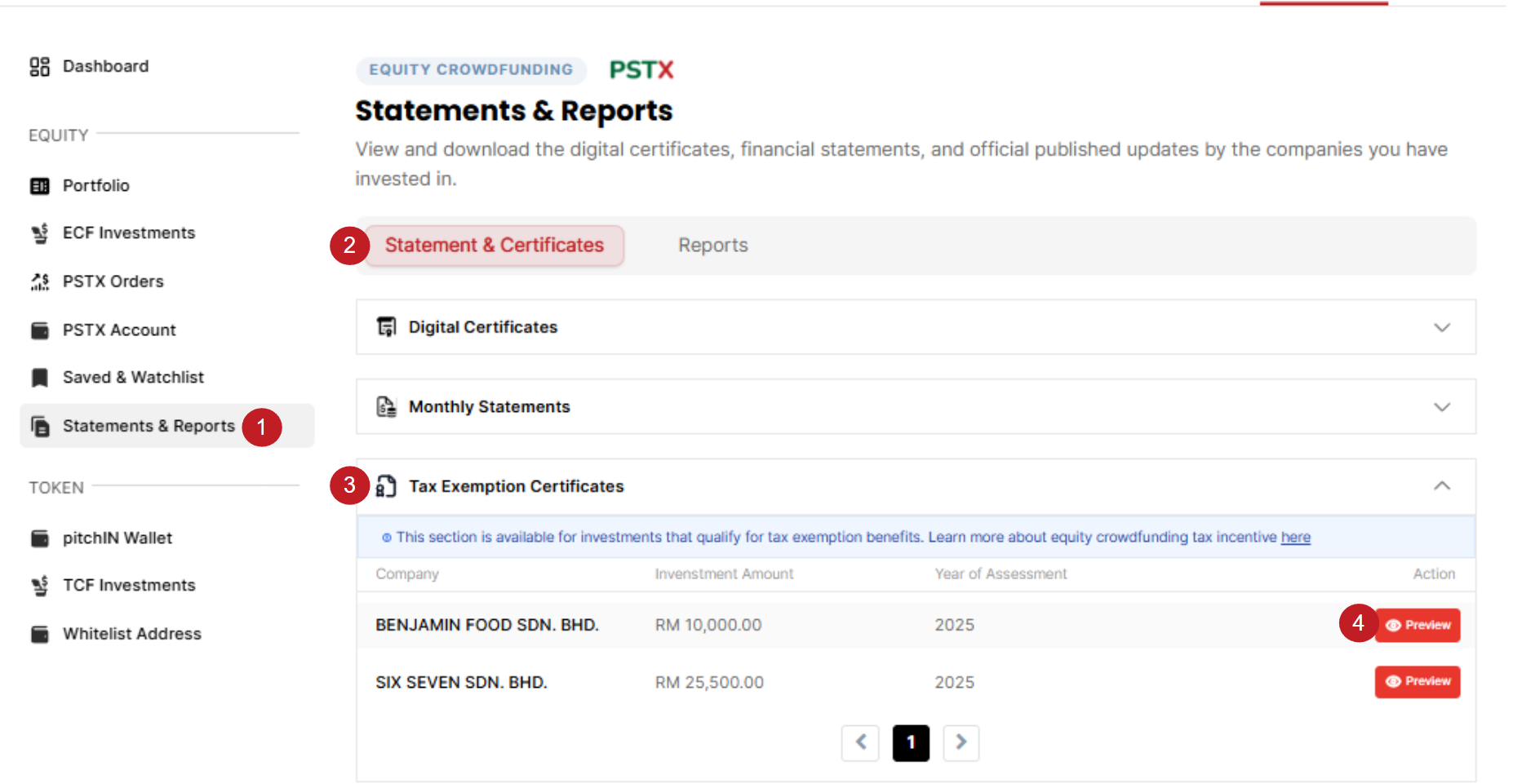
You can access and download your certificate directly from your account by following these steps:
- Log in to your pitchIN account.
- Navigate to Dashboard > Statements & Reports.
- Select the Statements & Certificates tab.
- Click on the Tax Exemption Certificates dropdown section.
- Find the relevant investment and click Preview.
- Verify your information: Ensure all personal details are accurate.
- Download: Once confirmed, you can download the certificate as a PDF file.
If you have any questions or do not see your certificate after the 2-year period, please contact our support team at support@pitchin.my.
Note: If you are looking for certificates for investments prior to Tax Assessment Year 2025 (i.e., investments made in 2022 and prior), these were sent to your registered email address. Please check your inbox or search for emails from pitchIN.